College Board APCS A
Due Date: January 9, 2026
Task 1: Join the Spring 2026 Google Classroom
Follow the steps below to make sure you are enrolled in the correct class.
- Sign up for your new Google Classroom for Spring 2026.
APCS A
Spring2026-Period 4
https://classroom.google.com/c/ODM3NDQ3ODAzNjE3?cjc=qrmokrhn
- Class code / link: Click here
Reminder: All tasks must be completed by the due date. Late submissions will receive point deductions.
Due Date: January 9, 2026
Due Date: January 9, 2026
Task 3: Verify Your Google Drive Setup According to Mr. Cusack’s Guidelines
In this task, you will verify that your Google Drive folder structure follows Mr. Cusack’s required specifications.
You will create a short video in which you step through your Google Drive folders and explain how your folders are organized.
Important setup steps:
Verify that a folder named Prior exists under My Drive. Create it if it does not already exist.
Move all existing files and folders into the Prior folder except the following:
• 2025_2026KleinCollins
• Classroom
• Kami
These three folders must remain outside of the Prior folder.
Verify that all of your class folders are located inside the 2025_2026KleinCollins folder.
Before recording your video, add the required text file with your name use a name using the following format:
PX_LastnameFirstName
Name your video file exactly as follows:
PX_googleDrive_Lastname.mp4
Mr. Cusack must watch and approve your video to verify that your folder structure meets his specifications.
After approval, submit the video in Google Classroom.
Once your setup is verified, obtain your secret code from Mr. Cusack.
Enter this code in the Private Comment section of the assignment in Google Classroom.
Due Date: January 9, 2026
Task 4: Review Your Prior Knowledge from Last Semester
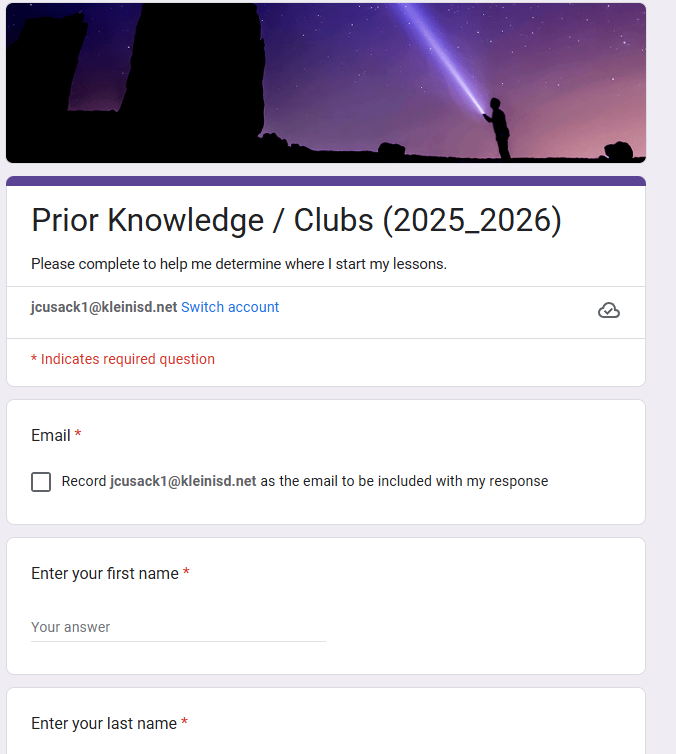
- Watch the video instructions.
- Complete the Prior Knowledge form again.
- When finished, take a screenshot use the image above as your guide.
- Save the screenshot using this file name format:
PX_Lastname_PriorKnowledge.png
- Modify PX to P? using your class period number.
- Replace Lastname with your actual last name.
- Double-check that your file name is correct.
- Save the file in your Google Drive using the folder structure Mr. Cusack instructed.
- Submit the file in Google Classroom when Mr. Cusack posts the assignment.
Due Date: January 9, 2026
Task 5: Ratios vs. Percentages (Math Skills Check)
This assignment checks if you have the math skills needed for Computer Science, Game Programming, and Cybersecurity.
Before you start, make sure you are signed in:
- You must be signed into Google Classroom.
- You must be signed into WayGround.
- If you are not signed in, you will not be able to complete the assignment.
- Review notes first: Ratios and Percentages notes (click here)
- Complete the WayGround quiz: Ratios vs. Percentages math problems (click here)
- You have unlimited tries.
Grading Rules (Read Carefully):
- You must score a 100 to receive a 100. Anything lower will result in a zero.
- I will deduct points from your 100 for any errors found in my version of the WayGround quiz.
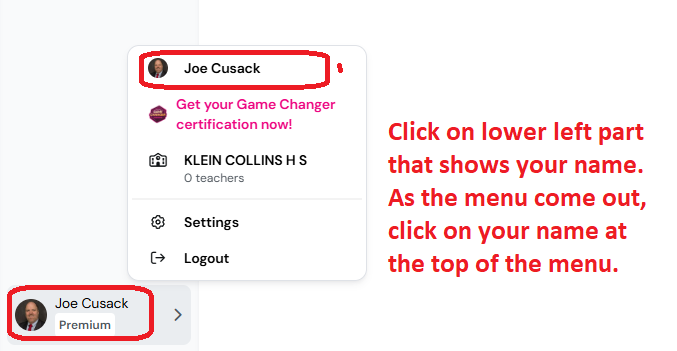
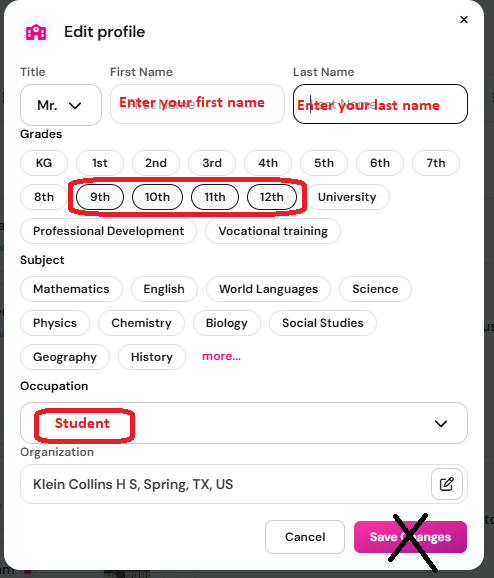
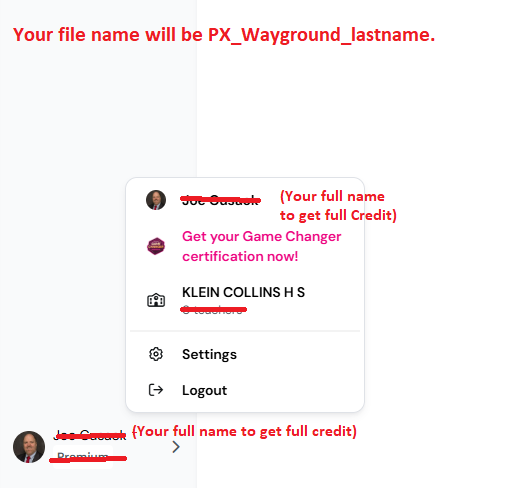
- Use your full name to receive credit.
- Stay signed into WayGround so your progress saves.
Allowed Resources:
- No calculators.
- You may only use pencil and paper.
Submission Instructions:
- Save your work as: PX_Ratio_lastname.png
- Turn it in on Google Classroom.
Reminder: All tasks must be completed by the due date. Late submissions will receive point deductions.
Due Date: January 9, 2026
Task 6: Exponents (Math Skills Check)
This assignment checks your exponent skills, which you will use in Computer Science, Game Programming, and Cybersecurity.
Before you start, make sure you are signed in:
- You must be signed into Google Classroom.
- You must be signed into WayGround.
- If you are not signed in, you will not be able to complete the assignment.
- Review notes first: Exponents notes (click here)
- Complete the WayGround quiz: Complete Exponent math problems - Click here
- You have unlimited tries.
Grading Rules (Read Carefully):
- You must score a 100 to receive a 100. Anything lower will result in a zero.
- I will deduct points from your 100 for any errors found in my version of the WayGround quiz.
- Use your full name to receive credit.
- Stay signed into WayGround so your progress saves.
Allowed Resources:
- No calculators.
- You may only use pencil and paper.
Submission Instructions:
- Save your work as: PX_Exponent_lastname.png
- Turn it in on Google Classroom.
Reminder: All tasks must be completed by the due date. Late submissions will receive point deductions.
Due Date: January 12, 2026
Task 7: Basic Algebra Tied to Computer Science (Math Skills Check)
This assignment tie algebra to computer science.
Before you start, make sure you are signed in:
- You must be signed into WayGround.
- You will take the Wayground inside your google classroom. Not in my web site.
- Review notes first: Algebra to Computer Science notes (click here)
- Complete the WayGround quiz: Click here.
- You have unlimited tries.
Grading Rules (Read Carefully):
- You must score a 100 to receive a 100. Anything lower will result in a zero.
- I will deduct points from your 100 for any errors found in my version of the WayGround quiz.
- Use your full name to receive credit.
- Stay signed into WayGround so your progress saves.
Allowed Resources:
- No calculators.
- You may only use pencil and paper.
Submission Instructions:
- Save your work as: PX_Algebra_lastname.png
- Turn it in on Google Classroom.
Reminder: All tasks must be completed by the due date. Late submissions will receive point deductions.
Resources
Resources
Cyber Range and Linux commands
Purpose
Note: To copy and paste between the Linux virtual environment and your Windows environment, use Ctrl + Shift + Alt.
Resources
Resources
Outline